In a city where café tables turn over fast and rent is measured by the minute, knowing the best free WiFi study spots in New York City is a genuine survival skill. The good news is that NYC is packed with places to plug in and work without paying a cent — starting with one of the best public library systems in the world.
This guide rounds up twelve spots with free, reliable WiFi suitable for studying: flagship NYPL and Brooklyn Public Library branches, a handful of laptop-friendly cafés, two university libraries (with honest notes on their access rules), a coworking option for guaranteed quiet, and the citywide LinkNYC network. For more, browse our study spots by city directory or our guide to the best places to study near me.
12 Free WiFi Study Spots in New York City
1. Stavros Niarchos Foundation Library (SNFL)
Address: Midtown Manhattan, 5th Ave & 40th St
Hours: Roughly Mon–Thu 8am–9pm, Fri 8am–8pm, Sat–Sun 10am–6pm — verify current hours
Directly across from the main NYPL building, SNFL is arguably the single best free study spot in Manhattan. It was designed with studiers in mind, with calm upper floors, ample power outlets at workstations, and a free public rooftop terrace for breaks.
Free NYPL WiFi is reliable throughout, and cardholders can book study rooms for focused or group work. The quietest floors (roughly two through five) are genuinely conducive to deep concentration.
It’s free, central and built for the job — if you only try one spot on this list, make it this one.
- WiFi: Free NYPL WiFi, reliable
- Outlets: Ample at workstations
- Noise level: Quiet (upper floors)
- Cost: Free
- Best for: long sessions, solo focus, bookable rooms
2. Stephen A. Schwarzman Building (NYPL Main / Rose Main Reading Room)
Address: Midtown Manhattan, 5th Ave & 42nd St
Hours: Roughly Mon/Thu–Sat 10am–6pm, Tue–Wed 10am–8pm, Sun 1pm–6pm — verify current hours
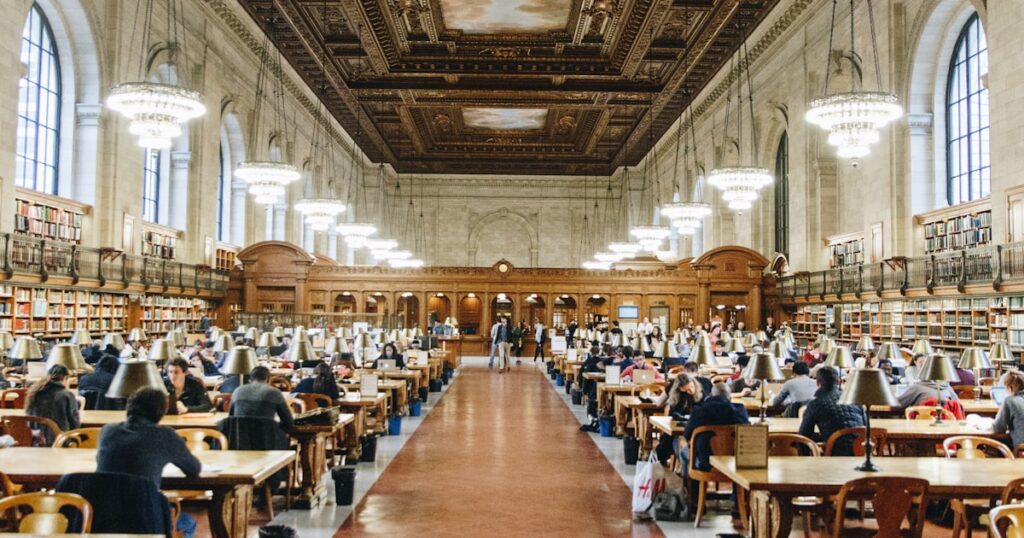
The iconic main branch offers free WiFi and the breathtaking Rose Main Reading Room, where a strict quiet policy makes for serious, distraction-free study under chandeliers and painted ceilings.
Outlets are limited at the historic tables but better in the newer reading areas. The reading rooms are open to the public without a card or appointment, so anyone can sit and work.
Note that morning tour windows (around 10–11am) make the Rose Room busier; arrive later or aim for a Tuesday or Wednesday evening for calmer conditions.
- WiFi: Free
- Outlets: Limited (better in newer areas)
- Noise level: Silent (Rose Reading Room)
- Cost: Free
- Best for: deep-focus solo study
3. 53rd Street Library (NYPL)
Address: Midtown Manhattan, E 53rd St near 5th Ave
Hours: Verify current hours
A modern, multi-level branch, the 53rd Street Library is a lighter, more relaxed alternative to the grand main building, with around 68 public computers and laptops available.
Free WiFi and a contemporary open design make it comfortable for casual studying, though the open layout means moderate noise rather than silence.
It’s a handy Midtown fallback when SNFL and the main branch are full.
- WiFi: Free
- Outlets: Yes
- Noise level: Moderate
- Cost: Free
- Best for: casual studying, solo
4. Brooklyn Public Library — Central Library
Address: Grand Army Plaza, Prospect Heights, Brooklyn
Hours: Roughly Mon–Thu 9am–9pm, Fri–Sat 9am–6pm, Sun 1pm–5pm — verify current hours
The spacious main reference building of the Brooklyn Public Library system offers free WiFi, quiet study areas and a grand central setting at the top of Prospect Park.
It’s the natural choice for Brooklyn-based students, with generous weekday evening hours that stretch later than many Manhattan branches.
Worth knowing: a renovation window is scheduled for parts of 2026, so check before visiting in case of access changes.
- WiFi: Free
- Outlets: Yes
- Noise level: Moderate (quiet zones available)
- Cost: Free
- Best for: long sessions, Brooklyn students
5. Bobst Library (NYU)
Address: Greenwich Village, Manhattan
Hours: Verify current hours
NYU’s main library has excellent WiFi, outlets and quiet study space — but access is the catch. There is no walk-in public access.
Access note: visitors must be sponsored by an NYU faculty or staff member and pre-register at least two business days ahead; affiliates of Cooper Union, The New School and NYSID get access without advance application.
We include it so you know the rules: unless you qualify, plan to study elsewhere. For eligible students it’s a superb, ID-gated environment.
- WiFi: Excellent (for eligible users)
- Outlets: Plentiful
- Noise level: Quiet
- Cost: Free for eligible users
- Best for: NYU-affiliated students (ID-gated)
6. Butler Library (Columbia University)
Address: Morningside Heights, Manhattan
Hours: Verify current hours
Columbia’s landmark library is similarly impressive and similarly restricted: it is not open to the general public.
Access note: visitors must check in with ID and fall into an approved category (consortial or day visitors, METRO referrals, sponsored guests), and day or borrowing access can be purchased. In practice it’s for students and affiliates.
Listed here for transparency — uptown studiers without affiliation are better served by the NYPL branches.
- WiFi: Free (for eligible users)
- Outlets: Plentiful
- Noise level: Quiet
- Cost: Free for affiliates
- Best for: Columbia-affiliated students (ID-gated)
7. Stumptown Coffee Roasters
Address: Multiple locations (Greenwich Village, NoMad/Ace Hotel, Brooklyn)
Hours: Verify current hours by location
A dependable specialty chain with free, high-speed WiFi and outlets at most locations, Stumptown is a reliable café base for a focused couple of hours.
Locations get busy at peak times, so the noise sits at moderate. The NoMad spot inside the Ace Hotel lobby has a particularly work-friendly atmosphere.
As with any café, buy a drink (and another every couple of hours) to keep your seat with a clear conscience.
- WiFi: Free, high-speed
- Outlets: Available
- Noise level: Moderate
- Cost: Price of a drink
- Best for: 1–3 hour café sessions, solo
8. Devoción
Address: Williamsburg flagship plus Brooklyn and Manhattan locations
Hours: Verify current hours by location
Devoción’s plant-filled Williamsburg flagship is one of the most photogenic — and roomy — café study spots in the city, with a skylit space, plenty of seating and outlets.
Free WiFi is available, though some locations limit it to weekdays, so confirm before settling in for a weekend session. Noise is moderate.
Best for a longer daytime study stretch when you want an airy, comfortable environment.
- WiFi: Free (weekday limits at some locations)
- Outlets: Available
- Noise level: Moderate
- Cost: Price of a drink
- Best for: longer daytime study, solo
9. Joe Coffee
Address: Multiple Manhattan locations (e.g. LaGuardia Place)
Hours: Verify current hours by location
A NYC staple, Joe Coffee offers free WiFi, outlets, restrooms and a relaxed vibe across its many locations — a solid neighbourhood pick for a shorter focused session.
Spaces are on the smaller side, so it’s better for quick sessions than all-day camping. Noise is moderate.
Reliable and everywhere, it’s the kind of place you can always find when you need to plug in fast.
- WiFi: Free
- Outlets: Available
- Noise level: Moderate
- Cost: Price of a drink
- Best for: shorter focused sessions, solo
10. The Roost
Address: East Village, Manhattan
Hours: Verify current hours
The Roost is a comfortable East Village café built for settling in, with free WiFi, outlets dotted around and a relaxed atmosphere that tolerates a full study day.
Noise stays low to moderate, making it one of the more focus-friendly neighbourhood cafés downtown.
A great pick when you want a café you can actually stay in for the long haul.
- WiFi: Free
- Outlets: Available
- Noise level: Low to moderate
- Cost: Price of a drink
- Best for: a full study day, solo
11. WeWork (On Demand / day pass)
Address: 70+ NYC locations
Hours: Verify by location
When you need guaranteed fast WiFi, a real desk and quiet zones for a full day, a coworking drop-in beats hunting for a café table. WeWork On Demand offers day passes across dozens of NYC buildings.
It’s not free — expect roughly $29–”39 a day — but unlimited coffee, abundant outlets and dependable internet make it worth it for high-stakes work days or video calls.
Book through WeWork On Demand or apps like Croissant and Deskpass; free trial passes occasionally pop up.
- WiFi: Fast, reliable
- Outlets: Everywhere
- Noise level: Quiet (zones available)
- Cost: Paid (day passes)
- Best for: full-day deep work, calls
12. LinkNYC kiosks
Address: All five boroughs (2,000+ kiosks)
Hours: 24/7
Not a seated venue but a genuinely useful free resource: LinkNYC kiosks provide free gigabit public WiFi (range about 150 feet), free phone calls and free device charging across the city.
They’re perfect for a quick connectivity top-up, charging your phone, or studying on a nearby bench or plaza when every café is full.
Think of them as a free citywide backstop that keeps you online between proper study spots.
- WiFi: Free gigabit public WiFi
- Outlets: Charging available
- Noise level: Outdoor (variable)
- Cost: Free
- Best for: quick top-ups, charging, outdoor study
How to Get Reliable Free WiFi While Studying in NYC
New York’s public libraries are the backbone of free, reliable study WiFi. Any NYPL or Brooklyn Public Library branch offers free internet and a seat at no cost, and you don’t need a library card just to sit and work — though a (free) card unlocks bookable study rooms at branches like SNFL.
Cafés expect a purchase in exchange for their WiFi and a table, which is a fair trade for a one-to-three-hour session. For longer or more demanding work — video calls, large downloads, a guaranteed quiet desk — a coworking day pass is the more dependable choice. And wherever you are, LinkNYC kiosks provide a free fallback connection.
A quick word on library cards: any New York resident — and many non-residents who work or study in the state — can get an NYPL or BPL card for free, online or in person, in minutes. While you don’t need one simply to sit and use the WiFi, the card unlocks bookable study rooms, free printing allowances, and access to e-resources and databases you’d otherwise pay for. For students on a budget, it’s one of the best-value sign-ups in the city.
Best Free WiFi Spots by Situation
For long, free, quiet sessions, SNFL is the gold standard, with the Schwarzman Building’s Rose Reading Room close behind for silent focus. For Brooklyn studiers, the Central Library at Grand Army Plaza is the obvious base. For shorter café sessions, Joe Coffee and Stumptown are reliable, while Devoción and The Roost reward longer stays.
For guaranteed performance — fast WiFi you can stake a deadline on — a WeWork day pass removes the guesswork. And for the in-between moments, a LinkNYC kiosk keeps you connected on the move. If you’re affiliated with NYU or Columbia, Bobst and Butler are excellent, but their access rules mean most people should plan around the public libraries.
Tips for Studying with Free WiFi in the City
Timing is everything in New York. Cafés fill up over lunch and after work, so aim for mid-morning or mid-afternoon to claim an outlet seat. Libraries are calmest early in the day and, for the NYPL main branch, on weekday evenings outside tour hours.
Carry a charger and a slim power bank — outlets are the real scarcity, not WiFi. If you handle sensitive logins, consider a VPN on public networks, and avoid leaving devices unattended even for a minute. Finally, double-check hours before you travel across boroughs; library and café schedules shift, and a wasted subway trip is the most New York way to lose a study hour.
One more practical note: NYC’s public WiFi quality varies with how crowded a space is. A library that’s blissfully fast at 9am can slow noticeably during the after-school and post-work rush as hundreds of devices pile on. If your work is connection-heavy, treat the early hours as prime time, and keep a LinkNYC kiosk or a café with its own network as a quick plan B. Downloading what you need offline before you arrive — readings, datasets, lecture slides — also insulates you from any single network having a bad afternoon.
Free Study Spots Across the Boroughs
Most of NYC’s headline free study venues cluster in Manhattan — SNFL, the Schwarzman Building and the 53rd Street Library are all in Midtown, within walking distance of each other and surrounded by cheap lunch options. For students and workers passing through Midtown, that density is hard to beat.
Brooklyn holds its own with the Central Library at Grand Army Plaza, plus dozens of neighbourhood BPL branches with the same free WiFi, and a thriving independent café scene in Williamsburg, Park Slope and Bushwick — Devoción’s flagship being the standout. If you live in the borough, you rarely need to cross the river to find a good seat.
Don’t overlook the outer boroughs. The Queens Public Library and additional NYPL branches in the Bronx and Staten Island all offer the same free internet and study space, often with shorter queues and quieter rooms than the famous Manhattan branches. Wherever you are, the rule holds: a nearby public library is almost always your most reliable free WiFi study spot, with a café or a LinkNYC kiosk to fill the gaps.
Final Thoughts
New York City makes studying for free genuinely viable, which is no small thing in one of the world’s most expensive cities. Between the NYPL and Brooklyn Public Library systems — led by the purpose-built SNFL — you have world-class, free, WiFi-equipped study space at your disposal, supplemented by a deep bench of laptop-friendly cafés and a citywide free network in LinkNYC.
Our advice: anchor your week on the libraries for serious work, lean on cafés for variety and lighter sessions, and keep a coworking day pass in reserve for the days that can’t afford a dropped connection. For more spots across the boroughs and beyond, explore our full study spots by city directory and our quiet places to study guide. With a little planning around timing and outlets, you can study comfortably across the city without ever paying for WiFi.
Late-Night & 24-Hour Study Options in New York City
New York earns its “city that never sleeps” reputation, which is great news for night-owl students. When most branch libraries and neighborhood cafés in New York City shut by 8 or 9PM, the five boroughs still offer plenty of places to keep working long past midnight if you know where to look.
Where to Study After 10PM in New York City
University students in New York City have some of the best late options: NYU’s Bobst Library near Washington Square and Columbia’s Butler Library up in Morningside Heights both keep extended late-night hours during term, and many CUNY libraries stay open late around exams. If you don’t have campus access, late-closing cafés cluster in the East Village, the West Village, and around Williamsburg in Brooklyn, where student-friendly coffee shops and dessert spots stay busy well into the night. Hotel lobbies in Midtown around Times Square and Herald Square are another quiet, well-lit fallback with seating and outlets.
24-Hour Study Spots in New York City
For genuinely round-the-clock work, New York City still has a handful of 24-hour diners — the kind clustered in the East Village, Hell’s Kitchen, and parts of Brooklyn — where a refillable coffee buys you a booth and a table for hours. Some Manhattan locations of national chains keep 24-hour service, and a few coworking spaces in the Financial District and Midtown offer round-the-clock access to members. The all-night reading rooms that pop up on NYU and Columbia campuses during finals are the gold standard if you’re enrolled.
Tips for Late-Night Studying in New York City
- The subway runs 24/7 in New York City, but late-night trains are infrequent — check the schedule for your line, and consider that express service often shifts to local after midnight.
- Stick to busy, well-lit corridors like Midtown, the Village, and main avenues when heading home late; avoid empty platforms and quiet side streets in unfamiliar neighborhoods.
- Bring a charger and snacks, since late-night spots may have limited food, and carry your student ID — some New York City venues and campus buildings require it for after-hours entry.
Looking further afield? See our guide to finding cafés with WiFi near you — how to spot a genuinely laptop-friendly café anywhere, plus researched guides to 29 US cities.
Frequently Asked Questions
Where can I study for free with WiFi in NYC?
The New York Public Library and Brooklyn Public Library branches are the best free study spots with WiFi — especially the Stavros Niarchos Foundation Library (SNFL) in Midtown, which has reliable free WiFi, ample outlets and bookable study rooms. You don’t need a card just to sit and work, and citywide LinkNYC kiosks add free public WiFi.
Do New York cafés have free WiFi for studying?
Many do. Chains and independents like Stumptown, Devoción, Joe Coffee and The Roost offer free WiFi and outlets, with the understanding that you buy a drink. They’re best for one-to-three-hour sessions, since tables turn over quickly at peak times.
Can I use NYU or Columbia libraries to study in NYC?
Only with the right access. NYU’s Bobst Library requires a sponsored visit pre-registered through faculty or staff, and Columbia’s Butler Library is not open to the general public without an approved category or purchased access. For free, open study space, use the public library branches instead.
Which NYC library is best for studying?
The Stavros Niarchos Foundation Library (SNFL) in Midtown Manhattan is widely considered the best NYC library for studying — it was purpose-built for it, with quiet upper floors, plentiful outlets, reliable free WiFi, bookable study rooms and a free rooftop terrace. The Schwarzman Building’s Rose Main Reading Room is the top pick for silent focus.